Commands Reference
All interactions with Octavia use Discord slash commands.
Permission Requirements
Commands marked as Admin Only require the user to hold the Administrator permission in the Discord guild, unless otherwise stated.
User Commands
Available to any server member without restrictions.
| Command | Description |
|---|---|
/verify |
Initiates the email verification workflow by opening the secure email modal. |
/data delete-user |
Deletes your personal verification data across all servers and removes verified roles. |
/globalstats |
Displays real-time bot analytics (total verifications and emails sent globally). |
/askai <question> |
Asks an AI assistant a question about UTM. Answers are grounded in utm.my and utm.gitbook.io. |
Administrator Commands
Role Configuration
Configures which Discord roles are automatically assigned upon successful email verification.
Default Roles
Every user who completes verification receives all roles listed in the default set.
| Command | Description |
|---|---|
/verifiedrole action:add role:[@Role] |
Adds a Discord role to the default verified set. |
/verifiedrole action:remove role:[@Role] |
Removes a role from the default set. |
/verifiedrole action:list |
Lists all configured default roles. |
/verifiedrole action:unverified role:[@Role] |
Sets the optional unverified role. Select the currently configured role to clear it. |
Domain-Specific Roles
Assigns additional specialized roles based on the user's email domain. These roles stack on top of default roles.
| Command | Description |
|---|---|
/domainrole action:add domain:[pattern] role:[@Role] |
Maps a specific domain pattern to a Discord role. |
/domainrole action:remove domain:[pattern] role:[@Role] |
Removes a domain-to-role mapping. |
/domainrole action:list |
Displays all active domain-to-role mappings. |
/domainrole action:clear domain:[pattern] |
Clears all role mappings for a specific domain. |
Autocomplete Support
When typing /domainrole action:add, the domain parameter provides autocomplete options populated directly from your allowed /domain list.
Domain Management
Specifies which email domain patterns are accepted during verification. Supports * as a wildcard.
| Command | Description |
|---|---|
/domain action:add domains:[text] |
Adds one or more allowed email domains (comma-separated). |
/domain action:remove domains:[text] |
Removes allowed domains (supports autocomplete). |
/domain action:list |
Displays all currently allowed domains. |
/domain action:clear |
Wipes the allowlist, effectively pausing verifications. |
Wildcard Pattern Examples:
| Pattern | Matching Behavior |
|---|---|
@utm.my |
Matches exactly user@utm.my |
@*.utm.my |
Matches subdomains like user@graduate.utm.my or user@student.utm.my |
@*.edu |
Matches any academic .edu address |
Email Blacklist
Blocks specific email addresses or wildcard patterns. The blacklist takes precedence over the domain allowlist.
| Command | Description |
|---|---|
/blacklist action:add emails:[text] |
Adds patterns to the blocklist (comma-separated, * wildcard). |
/blacklist action:remove emails:[text] |
Removes patterns from the blocklist (supports autocomplete). |
/blacklist action:list |
Displays all blocked patterns. |
/blacklist action:clear |
Clears the entire blacklist. |
Bot Settings & Model Configuration
| Command | Description |
|---|---|
/config type:events [forum_channel] [report_channel] |
Configures the Discord forum channel for Telegram events and the alert channel for spam reports. |
/config type:models [chatbot_model] [scraper_model] |
Configures custom Gemini AI model names (free-form strings, e.g. gemini-2.5-pro) for /askai and the scraper. |
/settings language:[lang] |
Sets UI language (english, german, spanish, polish, hebrew, korean). |
/settings log_channel:[#channel] |
Sets a channel for verification audit logs. Leave empty to disable. |
/settings verify_message:[text] |
Prepends custom text to OTP emails. Leave empty to reset to default. |
/settings promptnewtoverify:[true|false] |
Automatically DMs new members prompting them to verify on join. |
/settings auto_unverified:[true|false] |
Automatically assigns the configured unverified role on join. |
Setup & Moderation
| Command | Description |
|---|---|
/button channel:[#channel] buttontext:[text] [title] [message] [color] |
Posts a persistent verification embed with an interactive button. |
/manualverify user:[@User] email:[email] |
Bypasses OTP flow to manually verify a user. Logs to the audit channel. |
/errornotify target_type:owner |
Sends system error notifications to the guild owner (default). |
/errornotify target_type:channel channel:[#channel] |
Directs system error notifications to a specific channel. |
/errornotify target_type:user user:[@User] |
Directs system error notifications to a specific user via DM. |
System Information
| Command | Description |
|---|---|
/status |
Displays configuration health, live statistics, and flags potential setup errors. |
/help |
Displays step-by-step setup instructions and a command overview. |
Data Management
Irreversible Actions
Data deletion commands permanently wipe verification records from SQLite database files.
| Command | Description |
|---|---|
/data action:delete-user |
(User) Deletes your own verification records across all guilds. |
/data action:delete-server confirm:YES |
(Admin) Wipes all server configuration and user mappings for this guild. |
Telegram Scraper Commands
Controls the automated event feed pipeline connecting Telegram broadcasts to Discord forums.
| Command | Description |
|---|---|
/scrape action:run [channel] [force] |
Triggers an immediate, manual scrape cycle across all (or a specific) tracked channels. |
/scrape action:start |
Starts background automated periodic scraping. |
/scrape action:stop |
Aborts any active scrape cycle and disables background periodic scraping. |
/clear seendb [channel] |
Clears the database history of processed messages (allows rescraping). |
/clear lastmsgdb [channel] |
Clears the last processed message ID cursor (resets scraping progress). |
/channel action:add channel:[#channel] |
Adds a Telegram channel (@username or numeric -100... ID) to monitor. |
/channel action:remove channel:[#channel] |
Stops monitoring a specific Telegram channel. |
/channel action:list |
Displays all currently monitored Telegram channels. |
/tgblacklist action:add keyword:[text] |
Suppresses broadcast messages containing <keyword>. |
/tgblacklist action:remove keyword:[text] |
Removes a keyword from the scraper blocklist. |
/tgblacklist action:list |
Displays all active scraper blocklist keywords. |
/tgblacklist action:clear |
Clears all scraper blocklist keywords. |
Architectural Guidelines & Setup Notes
Role Hierarchy Requirement
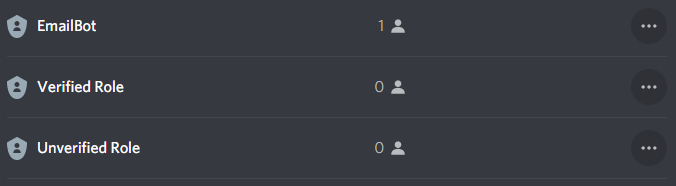
The Discord role assigned to the bot must sit higher in server role hierarchy than any verified or unverified roles it manages. If the bot's role is below the target role, Discord API requests will fail with Missing Permissions.
Recommended Unverified Role Pattern
To lock down your server until users verify their institutional email:
- Create a role named Unverified with read permissions restricted only to your
#verificationchannel. - Run
/role unverified @Unverified. - Enable automatic assignment on join:
/settings auto-unverified true. - When a user completes verification via
/verify, the bot automatically strips the Unverified role and assigns the verified roles.